SAP Business One Demo: What to Expect Before Choosing SAP B1
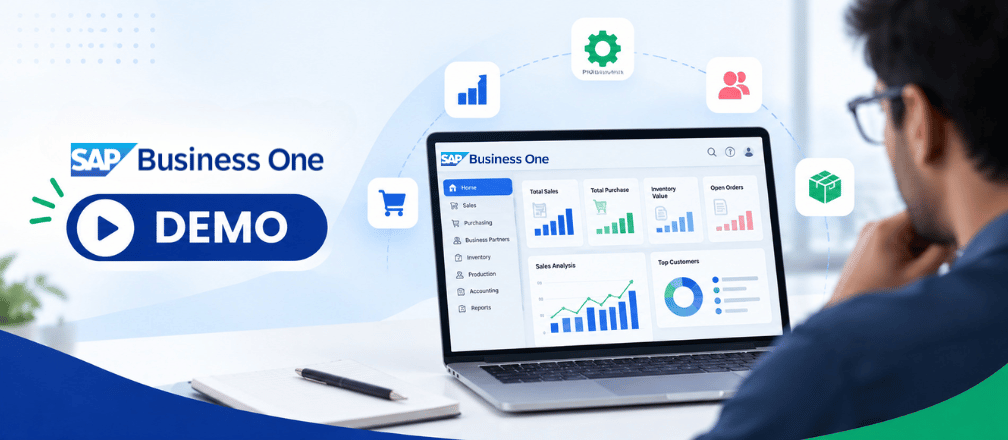
Choosing an ERP system is a major decision for any growing business. Before investing in software, implementation and training, it is important to understand how the ERP actually works and whether it fits your business processes.
This is where an SAP Business One demo can help.
An SAP Business One demo gives business owners, CFOs, IT Heads, production managers and other decision-makers an opportunity to explore the ERP, understand its capabilities and see how different business processes can be managed through a centralized system.
However, a good SAP Business One demo should be more than a simple product presentation. It should help you understand how SAP Business One can fit into your actual business operations.
What Is an SAP Business One Demo?
An SAP Business One demo is a guided demonstration of the ERP solution where an implementation expert explains relevant features, workflows and business processes.
Depending on your requirements, the demo can cover areas such as:
- Finance and accounting
- Sales
- Purchasing
- Inventory
- Production
- Material Requirements Planning (MRP)
- Warehouse management
- Customer relationship management
- Reporting and dashboards
- Approvals and user controls
- Integrations
- Industry-specific add-ons
The exact demo should be based on your company’s requirements rather than showing every feature available in the software.
Why Should You Attend an SAP Business One Demo?
An ERP can look impressive during a generic presentation, but the real question is:
“Can this ERP solve our business problems?”
A demo allows you to evaluate the software before making a major investment.
It can help you understand:
- How the system works
- Whether it supports your business processes
- How easy it is for employees to use
- What information management can access
- How different departments work together
- What customization may be required
- What integrations are possible
- Whether Cloud or On-Premise deployment is more suitable
For decision-makers, an SAP Business One demo can also help identify potential implementation challenges before the project begins.
What Should You Expect During an SAP Business One Demo?
A well-planned demo usually begins with an understanding of your business.
Before demonstrating the software, the implementation partner should ideally understand:
- Your industry
- Number of employees
- Number of ERP users
- Current ERP or accounting software
- Manufacturing processes
- Number of warehouses
- Number of branches or plants
- Current operational challenges
- Required integrations
- Reporting requirements
- Future growth plans
This allows the demonstration to focus on the processes that matter most to your organization.
For example, a manufacturing company should not spend its entire demo looking at CRM screens if its primary concern is production planning, inventory and costing.
Finance and Accounting Demonstration
Finance is one of the core areas of SAP Business One.
During the demo, you can explore how the system manages financial transactions and connects them with other business processes.
Areas that may be demonstrated include:
- General ledger
- Accounts payable
- Accounts receivable
- Journal entries
- Customer and vendor transactions
- Cash flow
- Financial reporting
- Tax-related processes
- Profit and loss reporting
- Balance sheet reporting
One of the key advantages of an integrated ERP is that financial information can be connected with transactions from purchasing, sales, inventory and other departments.
Sales Process Demonstration
The sales workflow is another important part of an SAP Business One demo.
You can see how a typical sales process moves through the ERP, from customer enquiry to order and delivery.
Depending on your requirements, the demo can cover:
- Customer master data
- Quotations
- Sales orders
- Delivery
- Invoicing
- Customer payments
- Sales reports
This can help your sales and finance teams understand how information moves between departments.
Purchasing Process Demonstration
For manufacturing companies, procurement is closely connected with inventory and production.
An SAP Business One demo can show how businesses manage:
- Supplier information
- Purchase requests
- Purchase orders
- Goods receipts
- Purchase invoices
- Purchase history
- Supplier reporting
The objective is to understand whether purchasing information can be connected with inventory and material requirements.
Inventory and Warehouse Management
Inventory management is often one of the most important areas for manufacturing businesses.
During the demo, ask to see how the system handles:
- Item master data
- Stock availability
- Warehouse-wise inventory
- Stock transfers
- Goods receipts
- Goods issues
- Batch management
- Serial numbers
- Inventory valuation
- Inventory reports
If your business operates multiple warehouses, ask the implementation partner to demonstrate a real-world multi-warehouse scenario.
Production and Manufacturing Demonstration
If you are a manufacturing company, production should be one of the main parts of your SAP Business One demo.
SAP Business One provides manufacturing capabilities including Bills of Materials, production orders and Material Requirements Planning.
Ask the implementation partner to demonstrate a complete production workflow.
For example:
Sales Order → Material Requirement → MRP → Purchase/Inventory → Production Order → Material Issue → Production Receipt → Finished Goods → Financial Impact
This gives you a better understanding of how the ERP connects different manufacturing processes.
Depending on your business requirements, you can also explore:
- Bill of Materials
- Production orders
- MRP
- Material consumption
- Finished goods
- Work-in-progress
- Production costing
- Inventory requirements
- Production planning
Reporting and Dashboards
An ERP should not only record transactions. It should also help management understand business performance.
During the demo, ask to see reports and dashboards relevant to your business.
Examples include:
- Sales analysis
- Inventory reports
- Purchase analysis
- Production reports
- Customer outstanding
- Vendor outstanding
- Profitability
- Financial statements
- Stock valuation
- Management dashboards
Ask whether reports can be customized according to your business requirements.
User Roles and Approvals
Different employees require different levels of access.
During your SAP Business One demo, ask how the system manages:
- User permissions
- Department-wise access
- Role-based controls
- Approval workflows
- Document approvals
- Transaction authorization
- Management controls
This is particularly important for organizations where finance, sales, production, procurement and warehouse teams have different responsibilities.
Integrations and Add-ons
Most growing businesses use multiple applications alongside their ERP.
During the demo, discuss the systems you currently use and ask how they can integrate with SAP Business One.
Potential integrations may include:
- Banking systems
- CRM
- HRMS
- E-commerce
- Barcode and QR code systems
- Logistics platforms
- E-invoicing
- E-Way Bill
- WhatsApp-related business processes
- Industry-specific applications
For manufacturing businesses, integrations with warehouse, barcode, production or logistics systems can be particularly important.
SAP Business One Cloud vs On-Premise
Your demo is also a good opportunity to discuss deployment options.
Cloud
Cloud deployment may be suitable for businesses looking for:
- Remote accessibility
- Reduced infrastructure management
- Flexible scalability
- Multi-location access
- Reduced dependence on physical servers
On-Premise
On-Premise deployment may be suitable for businesses that:
- Already have IT infrastructure
- Have dedicated IT teams
- Require greater infrastructure control
- Have specific infrastructure requirements
Ask the implementation partner to explain the advantages, costs, infrastructure requirements and ongoing responsibilities associated with both options.
What Questions Should You Ask During an SAP Business One Demo?
Don’t just watch the demonstration. Use the opportunity to ask specific questions about your business.
Here are some important questions:
1. Can SAP Business One handle our manufacturing process?
Ask the partner to demonstrate your actual production workflow.
2. Can we manage multiple warehouses?
If you have multiple locations, ask for a practical demonstration.
3. Can SAP Business One integrate with our existing software?
Discuss all critical systems before implementation.
4. How much customization will we need?
Understand what can be handled through standard functionality and where customization may be required.
5. What type of users and licenses will we need?
Ask the partner to map your employees to appropriate user requirements.
6. Can we access the ERP remotely?
Discuss Cloud and On-Premise options.
7. How long will implementation take?
The timeline depends on project scope, business complexity, data migration, customization and integrations.
8. What training will employees receive?
Ask about user training, documentation and post-go-live support.
9. What happens after go-live?
Understand the support process, SLA, escalation mechanism and ongoing maintenance.
10. What will the total investment be?
Ask for a clear breakup of license, implementation, customization, integration, infrastructure, hosting and support costs.
What Should You Prepare Before an SAP Business One Demo?
You can get much more value from the demo if you prepare beforehand.
Create a list of your current business challenges.
For example:
- Inventory mismatch
- Manual production planning
- Delayed reporting
- Multiple Excel files
- Separate accounting and inventory systems
- Difficulty tracking raw materials
- Lack of production visibility
- Multiple warehouses
- Manual approval processes
- Difficulty calculating production costs
Also prepare basic information such as:
- Number of users
- Current ERP
- Industry
- Annual turnover range
- Number of plants
- Number of warehouses
- Key modules required
- Existing software
- Integration requirements
The more information you provide, the more relevant the SAP Business One demo can be.
How to Evaluate SAP Business One After the Demo
After the demonstration, don’t evaluate the ERP only on its interface or number of features.
Evaluate it based on your actual business requirements.
Consider:
Functional Fit
Does SAP Business One cover your important business processes?
Ease of Use
Can employees understand and use the system effectively?
Manufacturing Capability
Does it support your production, inventory and planning requirements?
Integration
Can it connect with your existing business applications?
Scalability
Can it support your future growth?
Customization
Can it accommodate genuine business requirements without excessive customization?
Implementation Partner
Does the partner understand your industry and business processes?
Total Cost of Ownership
What will the complete investment look like over several years?
Common Mistakes Companies Make During an ERP Demo
Many companies make the mistake of treating an ERP demo like a standard software presentation.
Avoid these mistakes:
Choosing an ERP based only on the interface
A good-looking interface does not guarantee that the system will fit your business.
Not involving the right decision-makers
Finance, IT, production, sales and management may have different requirements.
Focusing only on price
The cheapest ERP may not deliver the required functionality or long-term value.
Not discussing customization
Unclear customization requirements can create cost and timeline issues later.
Ignoring implementation and support
Software is only one part of an ERP project. Implementation and post-go-live support are equally important.
Not asking for a real business scenario
Ask the partner to demonstrate your actual processes rather than only standard features.
SAP Business One Demo for Manufacturing Companies
For manufacturing companies, a customized SAP Business One demo should ideally cover the complete business cycle.
For example:
Customer Order
↓
Inventory Check
↓
MRP & Material Planning
↓
Purchase of Raw Materials
↓
Production Order
↓
Material Consumption
↓
Finished Goods
↓
Warehouse
↓
Sales & Delivery
↓
Invoice & Accounting
↓
Management Reporting
Seeing this complete flow helps management understand how SAP Business One can connect different departments through a single ERP platform.
Why Choose Cogniscient Business Solutions for SAP Business One?
Cogniscient Business Solutions is an SAP Business One Gold Partner helping businesses evaluate, implement, customize and support SAP Business One.
Our team can conduct requirement-based SAP Business One demos for businesses across different industries, including manufacturing.
The demonstration can be tailored around your:
- Business processes
- Industry requirements
- Number of users
- Manufacturing operations
- Warehouses
- Locations
- Existing ERP
- Integrations
- Reporting requirements
- Cloud or On-Premise requirements
Instead of simply showing software features, the objective should be to help you understand how SAP Business One can fit into your actual business operations.
Book a Personalized SAP Business One Demo
Still evaluating ERP options for your business?
Don’t choose an ERP based on a generic presentation. See how SAP Business One can work with your actual business processes.
Share your current ERP, number of users, manufacturing requirements, warehouses and key business challenges with our experts. We’ll help you identify the relevant SAP Business One functionality and demonstrate the processes that matter to your business.
Book a Free, Personalized SAP Business One Demo with Cogniscient Business Solutions today.
See SAP Business One in Action. Understand Your ERP Investment. Make a Confident Decision.
Frequently asked questions
What is an SAP Business One demo?
An SAP Business One demo is a guided presentation of the ERP’s relevant features and business processes. A customized demo can focus on areas such as finance, sales, purchasing, inventory, production, MRP, reporting and integrations.
Is the SAP Business One demo suitable for manufacturing companies?
Yes. Manufacturing companies can request a demo focused on production, BOM, MRP, inventory, purchasing, costing, warehouse management and related processes.
How long does an SAP Business One demo take?
The duration depends on the scope. A focused demonstration can cover key requirements, while a detailed business-process demonstration may require more time.
Can SAP Business One be customized for our business?
SAP Business One can be configured and, where required, extended through customization and add-ons. The extent of customization depends on the specific business requirement.
Can I see SAP Business One Cloud during the demo?
Yes. You can discuss and evaluate Cloud deployment as part of the demo, along with On-Premise deployment where relevant.
What information should I provide before an SAP Business One demo?
Providing your industry, number of users, current ERP, manufacturing processes, locations, warehouses, integrations and key business challenges can help the implementation partner prepare a more relevant demonstration.