
SAP Business One Implementation Process: Step-by-Step Guide
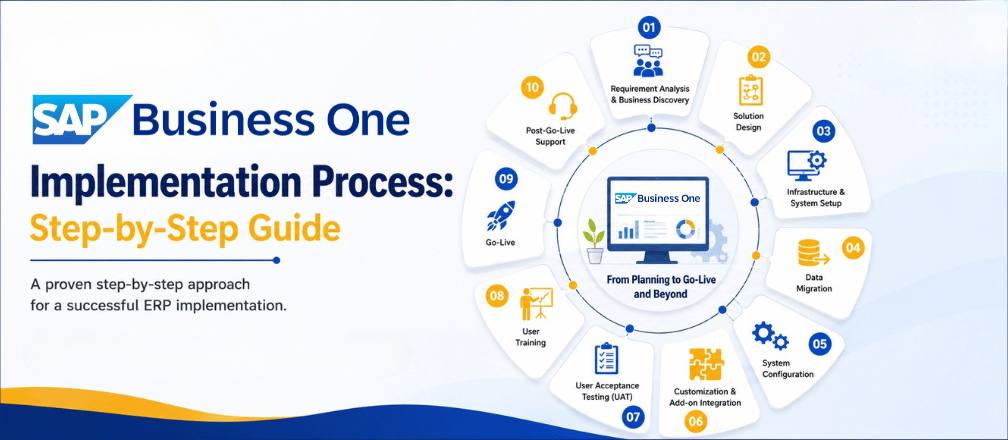
Implementing an ERP system is a significant step toward improving business efficiency, visibility, and growth. However, a successful implementation depends on proper planning, the right methodology, and an experienced implementation partner.
SAP Business One follows a structured implementation process that minimizes risks and ensures your business operations continue smoothly during the transition.
In this guide, we’ll walk you through each stage of the SAP Business One implementation process, helping you understand what to expect and how to prepare for a successful ERP journey.
Why a Structured ERP Implementation Matters
A well-planned implementation helps businesses:
- Reduce implementation risks
- Minimize operational disruptions
- Ensure accurate data migration
- Improve user adoption
- Achieve faster ROI
- Go live with confidence
Step 1: Requirement Analysis & Business Discovery
The implementation begins with understanding your business.
During this phase, the implementation team works closely with stakeholders to gather information about:
- Business processes
- Existing software
- Departmental workflows
- Challenges and pain points
- Future business goals
Deliverables
- Business Requirement Document (BRD)
- Project Scope
- Gap Analysis
- Implementation Plan
Step 2: Solution Design
Based on the business requirements, consultants design the ERP solution.
This includes:
- Company structure
- Master data setup
- Approval workflows
- User roles and permissions
- Reports and dashboards
- Process mapping
At this stage, any required customizations or add-ons are also identified.
Step 3: Infrastructure & System Setup
Next, the SAP Business One environment is prepared.
Depending on your deployment model, the system may be installed:
- On-Premise
- Cloud
- Hosted Environment
Activities include:
- Server setup
- Database installation
- SAP Business One installation
- User creation
- Security configuration
Step 4: Data Migration
One of the most critical implementation phases is migrating existing business data.
Typical data includes:
- Customers
- Vendors
- Item Masters
- Chart of Accounts
- Inventory
- Opening Balances
- Price Lists
Before migration, the data is cleaned, validated, and formatted to ensure accuracy.
Step 5: System Configuration
The ERP system is configured according to business requirements.
This includes:
- Financial settings
- Tax configuration
- Warehouses
- Approval procedures
- Payment terms
- Document numbering
- Business rules
The objective is to ensure SAP Business One reflects your organization’s operational processes.
Step 6: Customization & Add-on Integration
Every business has unique requirements.
If needed, consultants develop or integrate:
- Custom reports
- Dashboards
- Industry-specific add-ons
- Barcode solutions
- E-Invoicing
- GST Integration
- Third-party applications
- Mobile applications
Step 7: User Acceptance Testing (UAT)
Before going live, users test the system using real business scenarios.
The testing verifies:
- Business processes
- Reports
- Data accuracy
- User permissions
- Integrations
Any issues identified during UAT are resolved before deployment.
Step 8: User Training
Training ensures employees are comfortable using SAP Business One.
Training generally includes:
- Department-wise sessions
- Hands-on practice
- Process walkthroughs
- Report generation
- Daily transaction training
Well-trained users contribute significantly to implementation success.
Step 9: Go-Live
After successful testing and user approval, the ERP system goes live.
During this phase:
- Final data migration is completed
- Transactions begin in SAP Business One
- Consultants monitor system performance
- Immediate support is provided
This marks the official transition from the legacy system to SAP Business One.
Step 10: Post-Go-Live Support
Implementation doesn’t end after Go-Live.
Continuous support includes:
- User assistance
- Issue resolution
- Performance monitoring
- System optimization
- Additional training
- Software updates
Post-implementation support ensures long-term ERP success.
Typical SAP Business One Implementation Timeline
| Business Size | Estimated Timeline |
|---|---|
| Small Business | 4–8 Weeks |
| Medium Business | 2–4 Months |
| Large Manufacturing Business | 4–6 Months |
The timeline depends on business complexity, customizations, number of users, and data volume.
Best Practices for a Successful SAP Business One Implementation
- Define clear business objectives
- Involve key stakeholders early
- Clean your master data before migration
- Train end users thoroughly
- Choose an experienced implementation partner
- Test every business process before Go-Live
- Plan for continuous improvement after implementation
Common Challenges During ERP Implementation
Some common implementation challenges include:
- Incomplete requirements
- Poor data quality
- Resistance to change
- Lack of user training
- Scope changes during the project
- Insufficient testing
Working with an experienced SAP Business One partner helps overcome these challenges effectively.
Why Choose Cogniscient Business Solutions?
A successful ERP implementation depends on the expertise of your implementation partner.
Cogniscient Business Solutions (CBS) is an SAP Business One Gold Partner with 19+ years of experience helping businesses streamline operations through ERP solutions. We have successfully implemented SAP Business One across manufacturing, trading, distribution, retail, pharmaceuticals, automotive, food processing, chemicals, and many other industries.
Our SAP Business One Services
- ERP Consulting
- SAP Business One Implementation
- Business Process Mapping
- Data Migration
- Customization & Add-on Development
- Cloud Deployment
- User Training
- Annual Maintenance & Support (AMC)
- Performance Optimization
Our certified consultants follow a proven implementation methodology that minimizes risk and ensures a smooth transition to SAP Business One.
Conclusion
A successful SAP Business One implementation is more than installing software—it’s about transforming business processes, improving efficiency, and enabling informed decision-making.
By following a structured implementation process and partnering with an experienced SAP Business One Gold Partner like Cogniscient Business Solutions, businesses can achieve faster implementation, higher user adoption, and long-term success.
Frequently asked questions
How long does SAP Business One implementation take?
Most implementations take between 4 weeks and 6 months, depending on business size and project complexity.
What is the first step in SAP Business One implementation?
The first step is Requirement Analysis and Business Discovery, where business processes and project objectives are identified.
Can SAP Business One be customized?
Yes. SAP Business One can be customized with industry-specific add-ons, custom reports, workflows, and third-party integrations.
Why is user training important?
Proper training helps employees adopt the system quickly, reduces errors, and improves overall productivity after Go-Live.
Why choose Cogniscient Business Solutions for implementation?
As an SAP Business One Gold Partner with 19+ years of experience, Cogniscient provides end-to-end ERP implementation services, from consulting and deployment to customization, training, and ongoing support.